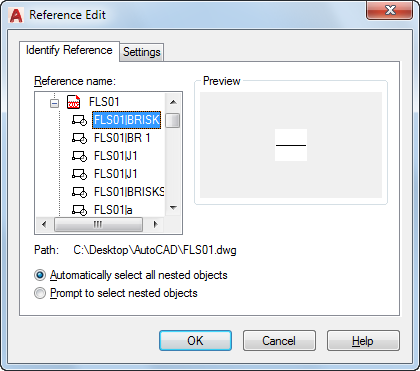
To select a reference to edit, select an object in the reference. If you select an object that is part of one or more nested references, the nested references are displayed in the dialog box.
List of Tabs
This dialog box includes the following tabs:
- Identify Reference
- Settings
Identify Reference Tab
Provides visual aids for identifying what to edit and control how it is selected.
Settings Tab
- Create Unique Layer, Style, and Block Names
Controls whether layers and other named objects extracted from the reference are uniquely altered.
If selected, named objects in xrefs are altered (names are prefixed with $#$), similar to the way they are altered when you bind xrefs. If cleared, the names of layers and other named objects remain the same as in the reference drawing. Named objects that are not altered to make them unique assume the properties of those in the current host drawing that share the same name.
- Display Attribute Definitions for Editing
Controls whether all variable attribute definitions in block references are extracted and displayed during reference editing.
If Display Attribute Definitions for Editing is selected, the attributes (except constant attributes) are made invisible, and the attribute definitions are available for editing along with the selected reference geometry. When changes are saved back to the block reference, the attributes of the original reference remain unchanged. The new or altered attribute definitions affect only subsequent insertions of the block; the attributes in existing block instances are not affected. Xrefs and block references without definitions are not affected by this option.
- Lock Objects Not in Working Set
Locks all objects not in the working set. This prevents you from accidentally selecting and editing objects in the host drawing while in a reference editing state.
The behavior of locked objects is similar to objects on a locked layer. If you try to edit locked objects, they are filtered from the selection set.