Specify the format and number of decimal places for linear and angular units.
Linear Units
You can choose from several common conventions to represent the format and the precision of linear distances and coordinates displayed in the Properties palette, dynamic input, the status bar, and other locations.
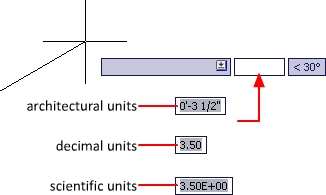
For example, here are three variations of dynamic input.
Angular Units
You can specify that positive values of angles are measured either clockwise or counterclockwise, and the direction of angle 0 (usually East or North). You can enter angles in grads, radians, or surveyor's units or in degrees, minutes, and seconds.
If you use surveyor's angles when specifying polar coordinates, indicate whether the surveyor's angles are in the north, south, east, or west direction. For example, to enter the relative coordinates for a property line that is 72 feet, 8 inches long with a bearing of 45 degrees north, 20 minutes, 6 seconds east, enter @72'8"<n45d20'6"e.