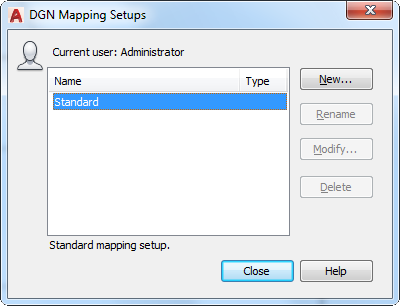
Creates, renames, modifies, and deletes mapping setups for DGN data import or export.
List of Options
The following options are displayed.
- Current User
Displays the user’s login name.
- Name
Lists all mapping setups. If the setup name is too long to be completely displayed, an ellipsis (...) is shown at the end.
NOTE: The Rename, Modify, and Delte buttons are disabled when the Standard mapping setup is selected.
- Type
Specifies the mapping setup type: import or export.
- Description
Displays the description of the selected mapping setup.
- New
Displays the New Mapping Setup dialog box, in which you can define a new mapping setup.
- Rename
Starts in-place editing of the currently selected mapping setup (direct editing in the list).
- Modify
Displays the Modify DGN Mapping Setup dialog box, in which you can modify the currently selected mapping setup.
- Delete
Deletes the currently selected mapping setup. After deletion, the mapping setup directly below the one deleted is selected. If there is none below, the one directly above it is selected.