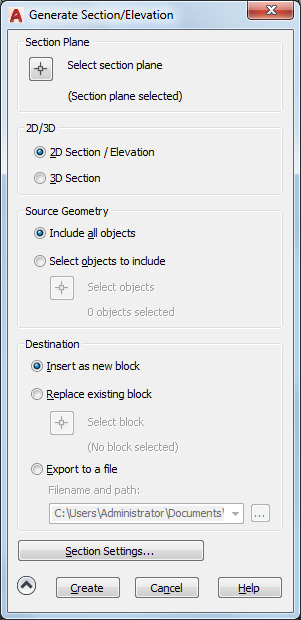
Saves 2D and 3D sections as blocks.
Specifies the display settings for the cross sections that you save and reuse.
List of Options
The following options are displayed.
Section Plane
- Select Section Plane
Closes the dialog box so that you can select a section plane to modify or save as a block.
2D/3D
- 2D Section/Elevation
Creates and saves or inserts a block that represents a 2D cross section.
- 3D Section
Creates and saves or inserts a cutaway 3D block.
Hide/Show Advanced Settings
Controls the display of the Source Geometry, Destination, and Section Settings options.
Source Geometry
- Include All Objects
Includes all 3D objects (3D solids, surfaces, and regions) in the drawing, including objects in xrefs and blocks.
- Select Objects to Include
Specifies that you will manually select the 3D objects (3D solids, surfaces, meshes, and regions) from which to generate a section.
- Select Objects
Closes the dialog box temporarily while you select the objects for the section. When you finish selecting objects, press Enter to redisplay the Generate Section/Elevation dialog box.
- Objects Selected
Indicates the number of objects selected.
Destination
- Insert as New Block
Inserts the generated section as a block in the current drawing.
- Replace Existing Block
Replaces an existing block in the drawing with the newly generated section.
- Select Block
Closes the dialog box temporarily while you select the block to be replaced in the drawing. When you finish selecting the block, press Enter to redisplay the Generate Section/Elevation dialog box.
- Export to a File
Saves the section to an external file.
- Filename and Path
Specifies a file name and path where the section will be saved.
Section Settings
Opens the Section Settings dialog box.
Create
Creates the section.