Access Methods
In the Layer Properties Manager, click the Layer Settings button.

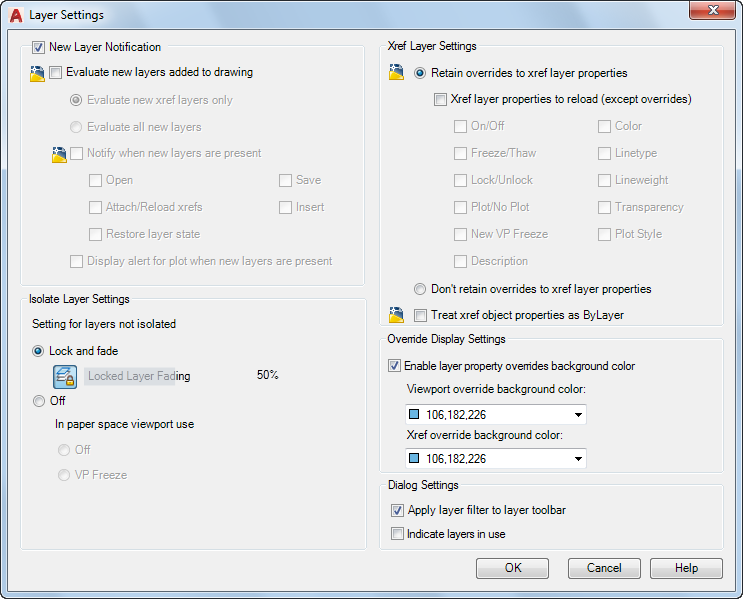
Controls when notification occurs for new layers, layer behavior when some layer are isolated, whether layer filters are applied to the Layers toolbar, and the background color of viewport overrides in the Layer Properties Manager.
List of Options
The following options are displayed.
New Layer Notification
Controls the evaluation and notification of new layers based on the LAYEREVAL settings in the DWG file.
NOTE: There should be no filter (Unreconciled Layer filter) displayed when LAYEREVALCTL = 0. If one is currently displayed, it will be turned off. You can set the unreconciled new layers filter active and select the layers in that filter. With the unreconciled layer selected, you can right-click and click Reconcile Layer.
Evaluate New Layers Added to Drawing
Checks for new layers that have been added to the drawing. (LAYEREVAL = 0)
- Evaluate New Xref Layers Only
Checks for new layers that have been added to attached xrefs. (LAYEREVAL = 1)
- Evaluate All New Layers
Checks for new layers that have been added to the drawing, including new layers added to attached xrefs. (LAYEREVAL = 2)
Notify when New Layers Are Present
Turns on new layer notification. (LAYERNOTIFY = 0)
- Open
Displays new layer notification when new layers are present when you use the OPEN command. (LAYERNOTIFY = 2)
- Attach/Reload Xrefs
Displays new layer notification when new layers are present when you are attaching or reloading xrefs. (LAYERNOTIFY = 4)
- Restore Layer State
Displays new layer notification when you are restoring layer states. (LAYERNOTIFY = 8)
- Save
Displays new layer notification when new layers are present when you use the SAVE command. (LAYERNOTIFY = 16)
- Insert
Displays new layer notification when new layers are present when you use the INSERT command. (LAYERNOTIFY = 32)
- Display Alert for Plot When New Layers are Present
Displays new layer notification when new layers are present when you use the PLOT command. (LAYERNOTIFY = 1)
Isolate Layer Settings
Controls settings for layers that have not been isolated:
- Lock and Fade
Selects Lock and Fade as isolation method.
- Off
Sets non-selected layers to Off.
- Off
Sets non-selected layers to Off (in paper space).
- VP Freeze
Sets non-selected layers to Viewport Freeze (in paper space).
Xref Layer Settings
Controls the display of xref layer property overrides in your current drawing.
Retain overrides to xref layer properties
Controls the display of xref layer property overrides. The properties of xref-dependent layers are not reloaded. Changes made to xref layer properties are retained (similar to setting
VISRETAIN =1).
Xref layer properties to reload (except overrides)
Turns on automatic reload of xref layer properties (By default,
VISRETAINMODE is set to 0, which means that no referenced layer properties are synchronized).
- On/Off
The On/Off xref layer setting is automatically reloaded to match the xref drawing layer settings.
- Freeze/Thaw
The Freeze/Thaw xref layer setting is automatically reloaded to match the xref drawing layer settings.
- Lock/Unlock
The Lock/Unlock xref layer setting is automatically reloaded to match the xref drawing layer settings.
- Plot/No Plot
The Plot/No Plot xref layer setting is automatically reloaded to match the xref drawing layer settings.
- New VP Freeze
The New VP Freeze xref layer setting is automatically reloaded to match the xref drawing layer settings.
- Description
The Description xref layer setting is automatically reloaded to match the xref drawing layer settings.
- Color
The Color xref layer setting is automatically reloaded to match the xref drawing layer settings.
- Linetype
The Linetype xref layer setting is automatically reloaded to match the xref drawing layer settings.
- Lineweight
The Lineweight xref layer setting is automatically reloaded to match the xref drawing layer settings.
- Transparency
The Transparency xref layer setting is automatically reloaded to match the xref drawing layer settings.
- Plot Style
The Plot Style xref layer setting is automatically reloaded to match the xref drawing layer settings.
Don't retain overrides to xref layer properties
Controls the properties of xref-dependent layers and all changes made to xref-dependent layer in the current drawing are valid in the current session only and not saved in the drawing. (similar to
VISRETAIN set to 0)
Treat xref object properties as ByLayer
Controls the display of object properties on referenced layers (XREFOVERRIDE system variable). Objects are treated as if their properties are set to ByLayer and every external reference layer can have its own set of layer overrides.
Override Display Settings
- Enable layer property overrides background color
Controls the background color highlighting for viewport and xref overrides.
- Viewport Override Background Color
Displays a list of colors and the Select Color dialog box where you can select a background color for viewport overrides.
- Xref Override Background Color
Displays a list of colors and the Select Color dialog box where you can select a background color for xref overrides.
Dialog Settings
- Apply Layer Filter to Layer Toolbar
Controls the display of layers in the list of layers on the Layers toolbar and Layers panel on the ribbon by applying the current layer filter.
- Indicate Layers in Use
Displays icons in the list view to indicate whether layers are in use. In a drawing with many layers, clear this option to improve performance.