With the Migrate Custom Settings utility, you can migrate your custom settings and files from a previous release.
The custom settings and files that can be migrated fall under the following categories:
Interface
- User Profiles (Not Available in AutoCAD LT)
User profiles are named collections of application and drawing environment settings. These settings include the drawing window color, cursor size, command window font, the spelling dictionary, and so on.
User profiles also include the locations in which the program searches for support, driver, customization, and other files. If your customized files are placed in locations other than the default locations, the paths to those locations are migrated, but the customized files themselves will not be migrated. Use the options of the Migrate Custom Settings utility to migrate your customized files, or manually copy the files between the locations of the previous and current release of the program.
- CUI
Customization (CUI/CUIx) files define user interface elements such as the Quick Access toolbar (QAT), ribbon panels and tabs, palettes, “classic” toolbars, and pull-down menus. Based on the previous release from which you are migrating, the Migrate Custom Settings utility looks for the CUI or CUIx file specified by the Main Customization File setting. The main customization file is migrated in addition to the partial customization files loaded in the main CUI/CUIx file.
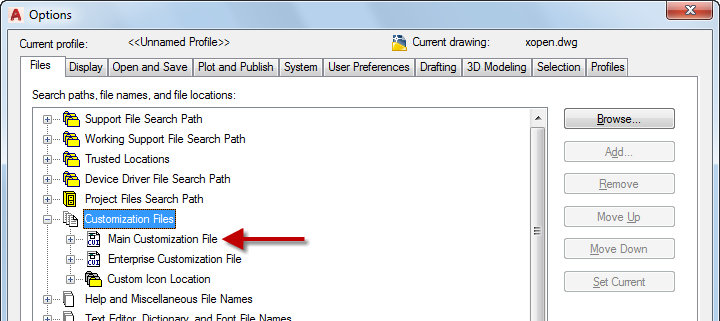
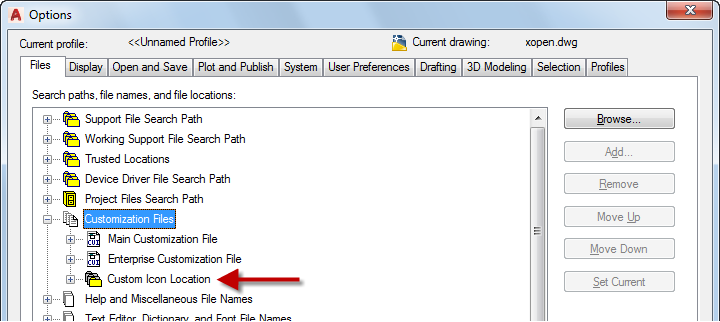
Many user interface elements display a custom image, that custom image is migrated when the command or user interface element that custom image is migrated between CUIx files. Custom images referenced by commands and user interface elements defined in a CUIx file are stored in one of two locations: inside of the CUIx file or externally in the location defined by the Custom Icon Location setting. Based on how a custom image is referenced, the process used to migrate that custom image is different.
The following explains how custom images are migrated:
- Images stored inside a CUIx file are copied to the CUIx file in the current release with the same name.
- Images stored in the location specified by the Custom Icon Location setting in the previous release are copied to the location specified in the current release.
- Tool Palettes
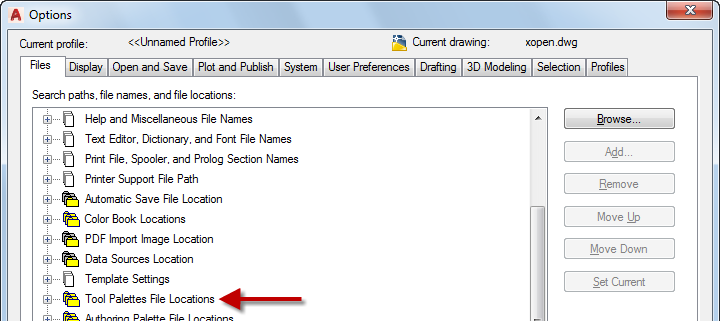
Tool palette files contain standard and user-defined tools. The files are stored in the locations specified by the Tool Palettes File Locations setting.
- User-defined Tool Palette Files. Custom tool palette files that were created in AutoCAD 2006-based products and later are migrated.
- Standard Tool Palette Files. Changes to the tool palettes starting with AutoCAD 2010-based product can be migrated to the current release. However, changes made to the tools added to a tool palette prior to this cannot be migrated and must be manually added back to the tool palettes for the current release.
When migrating tool palettes, custom tool palette groups are also migrated and merged with the default tool palette groups in the current release.
Tool palette groups are stored with a user profile. You can see the default tool palette groups by switching to the profile named <<Unnamed Profile>> or <<Product Name Unnamed Profile>>. (User Profiles are not available in AutoCAD LT.)
Settings
- Command Alias
Command aliases are shortened names that are used to start commands and are stored in the acad.pgp (or acadlt.pgp in AutoCAD LT) file. The Migrate Custom Settings utility can only migrate command aliases in the user-defined section of the PGP file from the previous release to the file with the same name in the current release.
- Plot Files
Plot files store various settings that control the output of a drawing file, including those for plotters and printers and that control the appearance of the linework in the output.
- Plotter Configuration (PC3) Files. Identifies the electronic formats and devices available to output a drawing. The PC3 files from a previous release are migrated to a subfolder named after the release in which they were migrated; the naming convention of the subfolder is Product Name PC3 Files. The subfolder is created to maintain compatibility with both the previous and current product release. The Product Name PC3 Files subfolder is created under the location defined by the Printer Configuration Search Path setting.
- Plotter Model Parameters (PMP) Files. Store user-defined paper sizes and calibration settings for a configured output device defined in a PC3 file. The PMP files from the previous release are migrated to the location defined under the Printer Description File Search Path setting.
- Plot Style Table (CTB/STB) Files. Control the color, linetype, lineweight and other settings in a drawing during output. The program supports two types of plot styles: color-dependent (CTB) and named (STB) plot styles. The CTB and STB files from the previous release are migrated to the location defined under the Plot Style Table Search Path setting.

- Templates
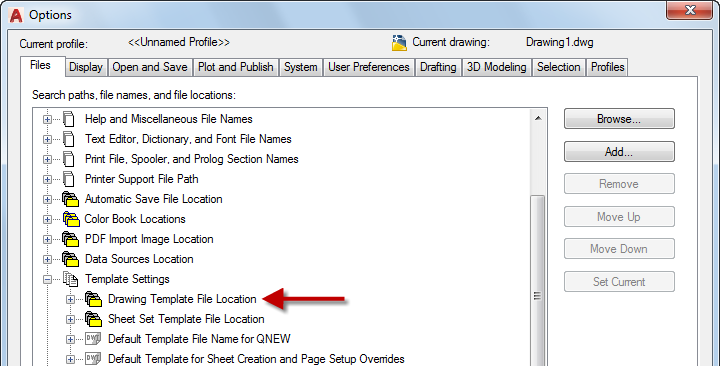
Drawing template (DWT) files are used to create new drawings. The drawings created using a DWT file contain all of the styles and drawing objects defined in the DWT file. The custom DWT files from the previous release are migrated into a subfolder named after the release in which they were migrated; the naming convention of the subfolder is Product Name Templates. The Product Name Templates subfolder is created under the folder defined by the Drawing Template File Location setting.
Content
- Hatch Patterns
Hatch pattern definitions are used to define the line patterns of a hatch object in a drawing and are stored in hatch pattern (PAT) files.
- User-defined Hatch Pattern Files. Hatch pattern definitions defined in their own PAT files are copied from the support folders of the previous release to the support folders of the current release.
- Standard Hatch Pattern Files. Hatch pattern definitions that ship with the program and are defined in the acad.pat and acadiso.pat (or acadlt.pat and acadltiso.pat in AutoCAD LT) files. The Migrate Custom Settings utility can migrate only the hatch pattern definitions in the user-defined section of the standard PAT files. The pattern definitions are copied from the previous release to the file with the same name in the current release.
- Linetypes
Linetype definitions are used to define the line patterns of drawing objects and are stored in linetype (LIN) files.
- User-defined Linetype Files. Linetype definitions defined in custom LIN files are copied from the support folders of the previous release to the support folders of the current release.
- Standard Linetype Files. Linetype definitions that ship with the program and are defined in the acad.lin and acadiso.lin (or acadlt.lin and acadltiso.lin in AutoCAD LT) files. The Migrate Custom Settings utility can migrate only the linetype definitions in the user-defined section of the standard LIN files. The linetype definitions are copied from the previous release to the file with the same name in the current release.
- Shapes
Shape definitions are used to define text fonts, and insert special characters in a linetype definition or drawing. The source for shape definitions is stored in a SHP file. Shape definitions must be compiled into a SHX file prior to them being available for used in a linetype or drawing; the COMPILE command is used to compile a SHP file into a SHX file. The Migrate Custom Settings utility migrates SHX files from the support folders of the previous release to the support folders of the current release.
- Materials (Not Available in AutoCAD LT)
Material definitions are used to control the appearance of surfaces and 3D solids in a drawing file when rendering to an image. The material definitions stored in the Favorites library of the Materials Browser can be migrated from the previous release to the current release. The Favorites library is represented by the FavoriteMaterials.adsklib on disk. Image files referenced by the material definitions stored in the library are not moved or copied.
List of Migrated Files
The following table lists the files and file types that are migrated with the Migrate Custom Settings utility. A description and details is provided for each file and file type listed to help you decide which files to migrate.
Before MNU, MNS, CUI, and CUIx files are migrated, a backup copy of each file is saved to the following location:
<drive>:\Users\<user profile>\AppData\Autodesk\<product version>\<release number>\<language>\Previous Version Custom Files