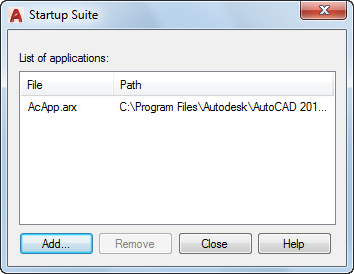
Adds and removes application files from the Startup Suite. These are the applications that are loaded each time you start AutoCAD.
List of Options
The following options are displayed.
- List of Applications
Displays an alphabetical list (by file name) of the application files to load at startup.
- Add
Displays the Add File to Startup Suite dialog box. You can use this dialog box to select files to add to the startup suite.
- Remove
Removes selected files from the Startup Suite.
NOTE:Starting with AutoCAD 2014-based products, the custom applications added to the Startup Suite must be placed in a trusted location; trusted locations are specified by the TRUSTEDPATHS system variable.