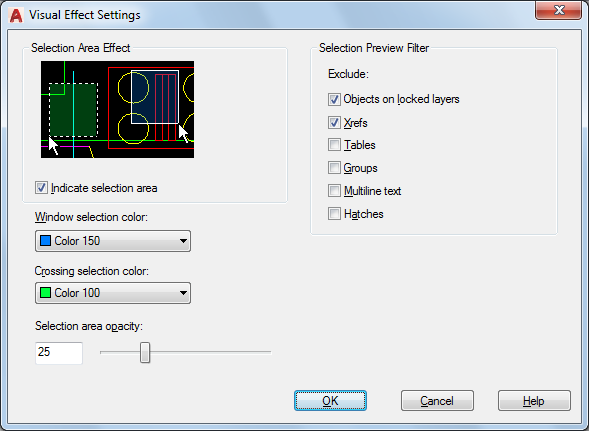
Controls the appearance of selection previewing.
Access Methods
Options dialog box, Selection tab
List of Options
The following options are displayed.
- Selection Area Effect
Controls the appearance of selection areas during selection preview.
- Preview Area
Displays the effect of the current settings.
- Indicate Selection Area
Controls the display of effects for selection areas. (SELECTIONAREA system variable)
- Window Selection Color
Controls the color of the transparent selection area during window selection. (WINDOWAREACOLOR system variable)
- Crossing Selection Color
Controls the color of the selection area during crossing selection. (CROSSINGAREACOLOR system variable)
- Selection Area Opacity
Controls the transparency of the selection area during window and crossing selection. (SELECTIONAREAOPACITY system variable)
- Selection Preview Filter
Specifies the object types which are excluded from selection previewing.
- Objects on Locked Layers
Excludes objects on locked layers from selection previewing. This option is on by default. (PREVIEWFILTER system variable)
- Xrefs
Excludes objects in xrefs from selection previewing. This option is on by default. (PREVIEWFILTER system variable)
- Tables
Excludes tables from selection previewing. (PREVIEWFILTER system variable)
- Groups
Excludes objects in groups from selection previewing. (PREVIEWFILTER system variable)
- Multiline Text
Excludes multiline text objects from selection previewing. (PREVIEWFILTER system variable)
- Hatches
Excludes hatch objects from selection previewing. (PREVIEWFILTER system variable)