Creates multiple parallel lines.
The following prompts are displayed.
Start point
Specifies the next vertex of the multiline.
If you create a multiline with two or more segments, the prompt includes the Close option.
- Next point
Draws a multiline segment to the specified point using the current multiline style and continues to prompt for points.
- Undo
Undoes the last vertex point on the multiline.
- Close
Closes the multiline by joining the last segments with the first segments.
Justification
Determines how the multiline is drawn between the points you specify.
- Top
Draws the multiline below the cursor, so that the line with the most positive offset is at the specified points.
- Zero
Draws the multiline with its origin centered at the cursor, so that the MLSTYLE Element Properties offset of 0.0 is at the specified points.
- Bottom
Draws the multiline above the cursor, so that the line with the most negative offset is at the specified points.
Scale
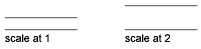
Controls the overall width of the multiline. This scale does not affect linetype scale.
The scale factor is based on the width established in the multiline style definition. A scale factor of 2 produces a multiline twice as wide as the style definition. A negative scale factor flips the order of the offset line—the smallest on top when the multiline is drawn from left to right. A negative scale value also alters the scale by the absolute value. A scale factor of 0 collapses the multiline into a single line.
Style
Specifies a style to use for the multiline.
- Style name
Specifies the name of a style that has already been loaded or that has been defined in a multiline library (MLN) file that you have created.
- ?—List styles
Lists the loaded multiline styles.