Ordinate dimensions measure the perpendicular distances from an origin point called the datum, such as a hole in a part. The datum is established by the current location of the UCS origin.
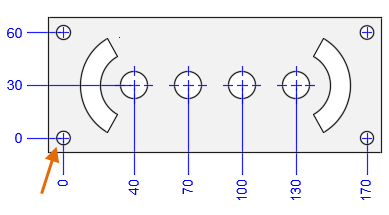
- Move the UCS origin to the datum.
- Click
Annotate tab
 Dimensions panelDimension.

- At the prompt, enter o (Ordinate).
- If you do not want jogs in the ordinate leaders, turn on Ortho mode [F8].
- Specify a point for the feature location.
- Specify a leader endpoint.
NOTE:You can also specify an X- or Y-datum to determine the orientation of the dimension location and dimension text.
You can use polar tracking to line up the text of the ordinate dimensions.