Set up rules to govern the position, slope, tangency, dimensions, and relationships between the geometric objects in a block.
Types of Constraints
When you add constraints to a dynamic block definition, you can add editable properties that control the parameters once the block is inserted in a drawing.
- Geometric constraints
Geometric constraints apply limits to how geometry that is associated in a block can be moved or modified. For example, you can specify that an object must remain perpendicular, tangent, concentric, or coincident with other block geometry. This provides a way to explore design options or make design changes while maintaining the requirements of the design. You can add geometric constraints to blocks inside the Block Editor the same way you constrain geometry outside of the Block Editor. Geometric constraints are available both on the ribbon and on the Block Authoring palettes.
- Dimensional constraints
Dimensional constraints control the size, angle, or position of geometry relative to the drawing or other objects. A dimensional constraint applied within the Block Editor using the BCPARAMETER command is called a constraint parameter. While you can use both dimensional constraints and constraint parameters in a block definition, only the constraint parameters will display editable custom properties for that block reference.
Constraint parameters contain parameter information that can be displayed or edited for the block reference.
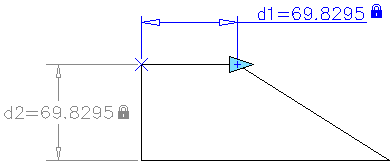
The above block definition contains both a linear constraint and a horizontal constraint parameter. The horizontal constraint parameter includes a grip, while the linear constraint does not. The horizontal constraint parameter is also dynamic, while the linear constraint is not.
Define User Parameters in Dynamic Blocks
You can control the geometry of constraint parameters with mathematical expressions. While you can insert both user variables and user parameters in the Block Editor, only user parameters are displayed as editable custom properties for a block reference.
Control Constrained Blocks with the Parameters Manager
Within the Block Editor, the Parameters Manager displays and controls the following categories:
- Action Parameters
- Attributes
- Dimensional Constraint Parameters (not available in AutoCAD LT)
- Reference Parameters (not available in AutoCAD LT)
- User Parameters (not available in AutoCAD LT)
For each of the above categories, you can display and control the following properties such as name, values, expressions, display order, and description.