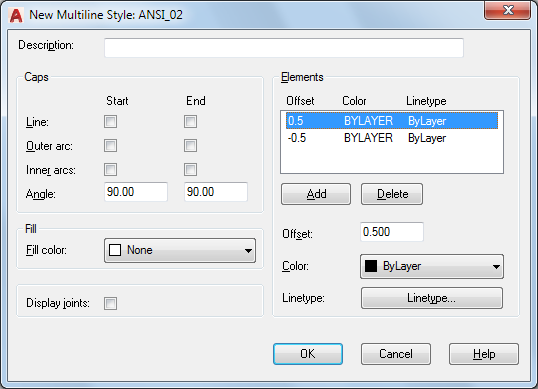
Sets the properties and elements for a new multiline style, or changes them for an existing multiline style.
List of Options
The following options are displayed.
Description
Adds a description to a multiline style.
Caps
Controls the start and end caps of the multiline.
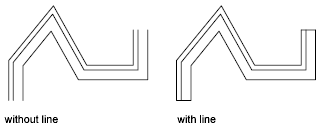
- Line
Displays a line segment across each end of the multiline.
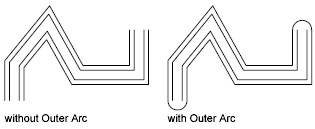
- Outer Arc
Displays an arc between the outermost elements of the multiline.
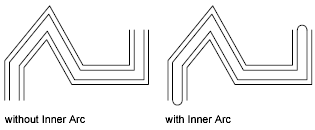
- Inner Arcs
Displays an arc between pairs of inner elements. If there's an odd number of elements, the center line is unconnected. For example, if there are six elements, inner arcs connect elements 2 and 5 and elements 3 and 4. If there are seven elements, inner arcs connect elements 2 and 6 and elements 3 and 5. Element 4 is left unconnected.
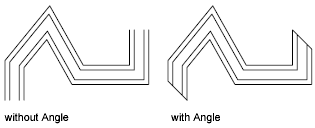
- Angle
Specifies the angle of the end caps.
Fill
Controls the background fill of the multiline.
- Fill Color
Sets the background fill color of the multiline. When you choose Select Color, the Select Color dialog box is displayed.
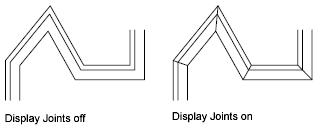
Display Joints
Controls the display of the joints at the vertices of each multiline segment. A joint is also known as a miter.
Elements
Sets element properties, such as the offset, color, and linetype, of new and existing multiline elements.
- Offset Color Ltype
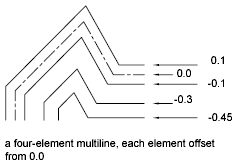
Displays all the elements in the current multiline style. Each element in the style is defined by its offset from the middle of the multiline, its color, and its linetype. Elements are always displayed in descending order of their offsets.
- Add
Adds a new element to the multiline style. Not available until color or linetype has been selected for a multiline style other than STANDARD.
- Delete
Deletes an element from the multiline style.
- Offset
Specifies the offset for each element in the multiline style.
- Color
Displays and sets the color for elements in the multiline style. When you choose Select Color, the Select Color dialog box is displayed.
- Linetype
Displays and sets the linetype for elements in the multiline style. When you choose Linetype, the Select Linetype Properties dialog box is displayed, which lists loaded linetypes. To load a new linetype, click Load. The Load or Reload Linetypes dialog box is displayed.