You open drawings to work on them just as you do with other applications. In addition, you can choose from several alternative methods.
TrustedDWG™ Drawing Files
DWG, DWT, and DWS files created with Autodesk applications and RealDWG™-based applications are trusted by Autodesk. When you open a TrustedDWG file, the following icon displays in the status bar.

If the DWGCHECK system variable is set to On (1), an alert box is displayed if
- The drawing file format is AutoCAD Release 14 or later and
- The drawing file was not originally created by an Autodesk application or RealDWG-based application.
For more information about TrustedDWG, click the TrustedDWG icon.
Change the Default Drawing Folder
Each time you start the product, the last folder that you used for opening or saving a file is set as the default path in the standard file selection dialog box. Alternatively, you can specify a fixed default folder with the program shortcut icon in Windows. For specific instructions, see the topic To Change the Default Drawing Folder below.
Access Your Drawings Remotely
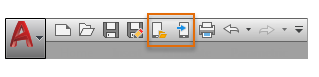
You can save and open specified drawing files in your online Autodesk Web & Mobile Account, which is accessible from any of your internet-connected devices. You can use this feature instead of emailing your drawing files to yourself. By default, the commands for saving and opening files from your online account are available from the Quick Access toolbar.
Use the eTransmit feature to package a set of files and avoid missing files when sharing drawings with others outside of your company.
Resolve Missing References
When you open a drawing, you are notified when a reference cannot be located. From the References - Unresolved Reference Files task dialog box, click Update the Location of the Referenced Files to open the External References palette to make changes to missing external references.
The following table outlines some of the references that might be missing and describes how to handle them.