Access Methods
Options dialog box, System tab
List of Options
The following options are displayed.
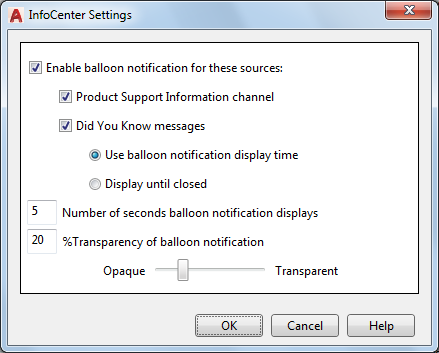
- Enable Balloon Notification for These Sources
Controls whether the balloon notification feature is turned on or off.
- Product Support Information Channel
Controls whether product support notifications are displayed.
- Did You Know Messages
Controls whether helpful messages and tips are displayed.
Did You Know messages provide Knowledge Base information and general instructional messages. Click the text or the Expand icon to view the detailed information.
- Use Balloon Notification Display Time
Displays the balloon message for the number of seconds that you specify below.
- Number of Seconds Balloon Notification Displays
Specify the length of time that the balloon displays before automatically closing.
- % Transparency of Balloon Notification
Controls the display transparency of the balloons from 0 (opaque) to 80 (nearly transparent).