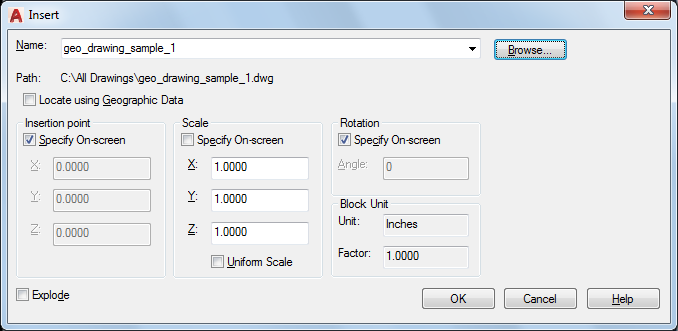
Specifies the name and position of the block or drawing to insert.
The position of the inserted block depends on the orientation of the UCS.
Name
Specifies the name of a block to insert, or the name of a file to insert as a block.
- Browse
Opens the Select Drawing File dialog box (a standard file selection dialog box) where you can select a block or drawing file to insert.
- Path
Specifies the path to the block.
- Locate Using Geographic Data
Inserts drawing using geographic data as the reference.
Specifies if the current and attached drawing contain geographic data. This option is available only if both drawings have geographic data.
- Description
Displays the description that was saved with the block.
- Preview
Displays a preview of the specified block to insert. A lightning bolt icon in the lower-right corner of the preview indicates that the block is dynamic. A icon indicates that the block is annotative.
Insertion Point
Specifies the insertion point for the block.
- Specify On-Screen
Specifies the insertion point of the block using the pointing device.
- Input Coordinates
Allows you to manually enter the X, Y, and Z coordinate value for the insertion point of the block.
- X
Sets the X coordinate value.
- Y
Sets the Y coordinate value.
- Z
Sets the Z coordinate value.
Scale
Specifies the scale for the inserted block. Specifying negative values for the X, Y, and Z scale factors inserts a mirror image of a block.
- Specify On-Screen
Specifies the scale of the block using the pointing device.
- Input Scale Factor
Allows you to manually enter a scale factor for the block.
- X
- Y
- Z
- Uniform Scale
Specifies a single scale value for X, Y, and Z coordinates.
Rotation
Specifies the rotation angle for the inserted block in the current UCS.
- Specify On-Screen
Specifies the rotation of the block using the pointing device.
- Input Angle
Allows you to manually enter an angle of rotation for the block.
- Angle
Sets a rotation angle for the inserted block.
Block Unit
Displays information about the block units.
- Unit
Specifies the INSUNITS value for the inserted block.
- Factor
Displays the unit scale factor, which is calculated based on the INSUNITS value of the block and the drawing units.
Explode
Explodes the block and inserts the individual parts of the block. When Explode is selected, you can specify a uniform scale factor only.
Component objects of a block drawn on layer 0 remain on that layer. Objects having color BYBLOCK are white. Objects with linetype BYBLOCK have the CONTINUOUS linetype.