Create Callout Blocks and Label Blocks (Advanced)
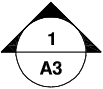
If you create a block to be used as a callout block or label block in a sheet set, you can use a placeholder field to display information such as view title or sheet number. The callout or label block must be defined in a DWG or DWT file that is specified in the Sheet Set Properties dialog box. Later, you can insert the callout or label block from a shortcut menu on the Sheet Views tab in the Sheet Set Manager.
For the field to display the correct information about a view or sheets on which you later insert it, the field must be included within a block attribute, not text, when you define the block. To create the block attribute definition, insert a placeholder field as the value, select the Preset option, and specify a tag.
- Add label blocks to views. With the Sheet Set Manager, you can label views and details automatically as you place them. Labels contain data associated with the referenced view.

- Add callout blocks to views. Callout blocks is the term for the symbols that reference other sheets. Callout blocks have many industry-specific names such as reference tags, detail keys, detail makers, building section keys, and so on. Callout blocks contain data associated with the sheet and view that are referenced.