Create radius or diameter dimensions of arcs or circles.
Create a Radius or Diameter Dimension
- Click
Annotate tab
 Dimensions panelDimension.

- Select an arc or a circle.
- At the prompt, enter r (Radius) or enter d (Diameter).
- Before specifying the dimension line location, you can edit or rotate the text.
- Click to place the dimension line.
- Repeat steps to continue dimensioning or press Enter to end dimensioning.
Create a Jogged Radius Dimension
- Click
Annotate tabDimensions panelDimension.
- Hover over an arc or a circle.
- At the prompt, enter j (Jogged).
- Select the arc or circle.
- Click to specify a point for the false-center dimension origin, called the
center location override.
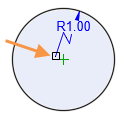
- Click to specify a point for the dimension line angle.
- Click to specify the location of the dimension jog.
- Repeat steps to continue dimensioning or press Enter to end dimensioning.