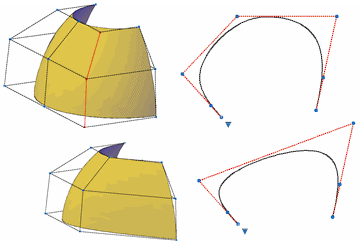
Removes control vertices from NURBS surfaces and curves.
Removes control vertices in the U or V direction. This illustration shows a row of control vertices deleted in the V direction.
NOTE: The minimum number of control vertices that you can have on a surface or curve is two in any direction. If you try to remove more, an error displays.
The following prompts are displayed.
- Select a NURBS surface or curve to remove control vertices
Select a valid NURBS surface or curve and press Enter.
- Point
Specifies a valid NURBS surface or curve and press Enter.
- Remove Knots
Turns off the display of control vertices and allows you to remove a point directly from the surface. This option only displays if you select a surface; it does not display for splines.
- Remove Edit Point
Turns off the display of control vertices and allows you to remove a point directly from the spline. This option only displays if you select a spline, it does not display for surfaces.
- Direction
Specifies whether to remove control vertices in the U direction. This option only displays if you have selected a surface; it does not display for splines.