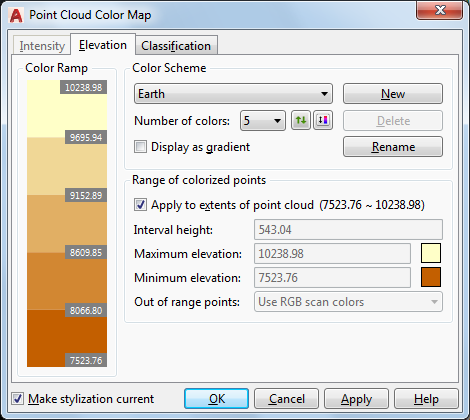
Edits the color scheme settings for Elevation point cloud stylization.
The Intensity, Elevation, and Classification stylizations colorize a point cloud based on the relevant point data in the point cloud. You can choose predefined color schemes like "Spectrum" or "Earth," or create your own schemes. You can assign the same color scheme to Intensity and Elevation, or assign a different scheme to each. Classification has a separate set of schemes.
List of Options
The following options are displayed.
Color Ramp
Shows the range of color values that will be applied to the point cloud. You can click a color here to change it.
Color Scheme
Lists all color schemes defined in the drawing. Choose a predefined color scheme or create your own.
- Number of Colors
Specifies the number of colors in the color scheme.
- Reverse Colors

Reverses the order of the colors in the color ramp.
- Re-Ramp Colors

Re-ramps the color ramp based on the first and last colors.
- Display As Gradient
Specifies whether to apply the color range as a gradient or as separate bands of color.
Range Of Colorized Points
- Apply To Extents
Sets the range to the highest and lowest elevation values in the point cloud.
- Interval Height
Sets the elevation interval for each color in the color ramp. When you change this value, Maximum Elevation is recalculated.
- Maximum Elevation
Sets the maximum elevation to which the color scheme is mapped. When you change this value, Interval Height is recalculated.
- Minimum Elevation
Sets the minimum elevation to which the color scheme is mapped. When you change this value, Interval Height is recalculated.
- Out of Range Points
Sets the display for points with values higher or lower than the specified range.