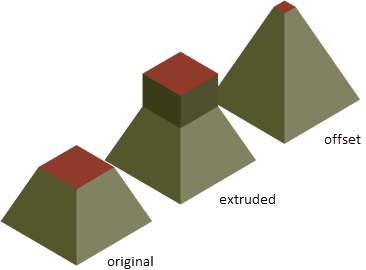
How to extrude or offset a face using a press or pull operation.
Offset a Bounded Area on a 3D Solid Face
Use this method to adjust adjacent faces to the new position of the offset face.
- Click
 .
. 
- Press Ctrl+click a bounded area on a 3D solid object and move the cursor to establish an offset direction.
Edge highlighting indicates which areas will be offset.
- Enter a value or click in the drawing area to set the offset distance.
Extrude a Bounded Area on a 3D Solid Face
Use this method if you want adjacent faces to remain unaffected by the new position of the offset face.
- Click .
- Click a face on a 3D solid object and move the cursor to establish an offset direction.
Edge highlighting indicates which faces can be offset.
- Enter a value or click in the drawing area to set the extrusion distance.