To Choose a 2D Isometric Drawing Plane
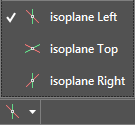
On the status bar, click the drop-down arrow on the Isometric Drafting status bar button and select the desired isoplane (
).
When you are finished with 2D isometric drawing, click
on the status bar to return to orthographic drawing.
NOTE:
The status bar icon changes depending on the current isoplane.
 ).
). on the status bar to return to orthographic drawing.