How to select point cloud color stylizations and assign color schemes.
Choose a Color Stylization
Click Point Cloud tab  Visualization panel color stylization flyout to choose one of the following stylization options.
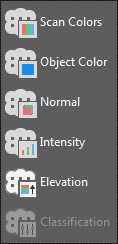
- Scan Colors. This option displays points with the real-world colors originally captured during the scanning process by a camera built into the scanner.
- Object Color. This stylization assigns the color property of the point cloud object to all points in that cloud.
- Normal. This option assigns colors to points based on the normal direction of the points.
- Intensity. This option assigns colors to points based on their laser pulse return intensity value.
- Elevation. This stylization assigns colors to points based on their Z values.
- Classification. This option colors each point based on their classification.
Assign a Color Scheme
Colorization for the intensity, elevation, and classification stylizations is based upon the color scheme you assign. You can assign a different color scheme to each stylization.
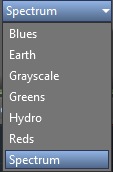
Click Point Cloud tab Visualization panel color scheme flyout to choose one of the following color schemes. Spectrum is the default.
Customize a Color Scheme
For the intensity and elevation stylizations, you can edit the color band or gradient ramp for a color scheme and change the minimum/maximum range values to which the color ramp is applied. For the classification stylization, you can assign the color to be displayed for each classification category.
Customize the Color Scheme for Intensity and Elevation Stylizations
- Click Point Cloud tab Visualization panel Color Mapping.

- On the Color Mapping dialog box, click the Intensity or Elevation tab.
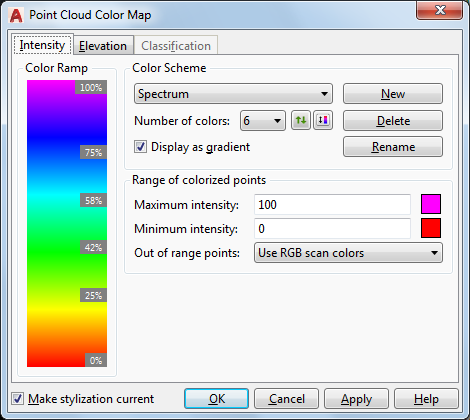
- Edit the color scheme settings, individual colors in the color ramp, and/or the range of points as needed.
Customize the Color Scheme for the Classification Stylization
- Click Point Cloud tab Visualization panel Color Mapping.
- On the Color Mapping dialog box, click the Classification tab.
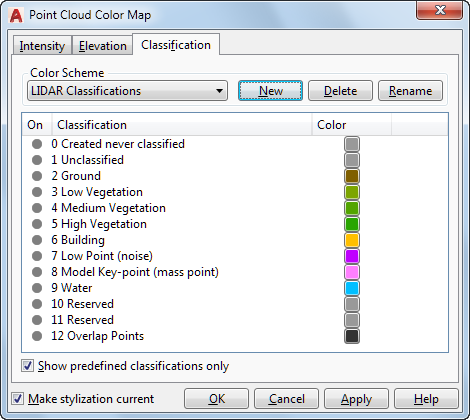
- To control the display of point cloud points that correspond to each classification, click the on/off icon to turn on or turn off the display.
- To change the color assigned to a classification, click the corresponding color square and select a new color.