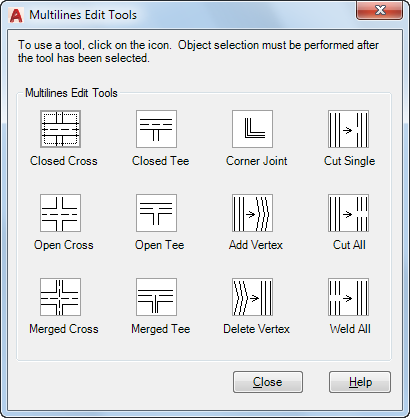
The dialog box displays tools with sample images in four columns. The first column controls multilines that cross, the second controls multilines that form a tee, the third controls corner joints and vertices, and the fourth controls breaks in multilines.
List of Options
The following options are displayed.
Closed Cross

Creates a closed-cross intersection between two multilines.
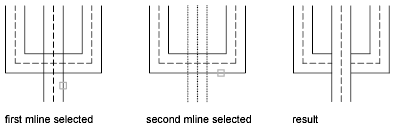
- Select First Mline. Select the foreground multiline
- Select Second Mline. Select the intersecting multiline.
Open Cross

Creates an open-cross intersection between two multilines. Breaks are inserted in all elements of the first multiline and only the outside elements of the second multiline.
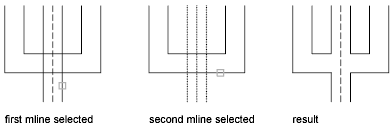
- Select First Mline. Select a multiline
- Select Second Mline. Select the intersecting multiline.
Merged Cross

Creates a merged-cross intersection between two multilines. The order in which you select the multilines is not important.
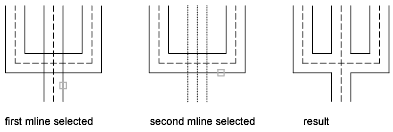
- Select First Mline.
- Select Second Mline.
Closed Tee

Creates a closed-tee intersection between two multilines. The first multiline is trimmed or extended to its intersection with the second multiline.
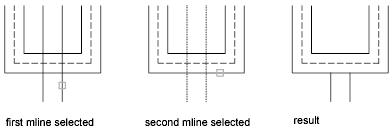
- Select First Mline.
- Select Second Mline.
Open Tee

Creates an open-tee intersection between two multilines. The first multiline is trimmed or extended to its intersection with the second multiline.
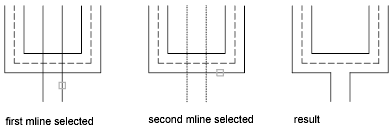
- Select First Mline.
- Select Second Mline.
Merged Tee

Creates a merged-tee intersection between two multilines.The multiline is trimmed or extended to its intersection with the other multiline.
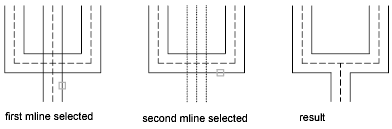
- Select First Mline.
- Select Second Mline.
Corner Joint

Creates a corner joint between multilines. The multilines are trimmed or extended to their intersection.
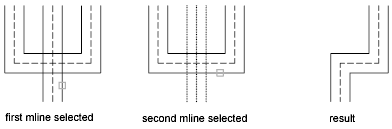
- Select First Mline.
- Select Second Mline.

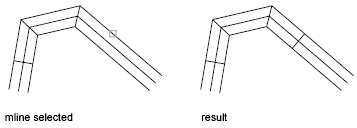
Delete Vertex

Deletes a vertex from a multiline.
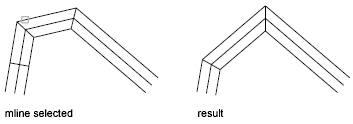
- Select Mline. The vertex nearest to the selected point is deleted.
Cut Single

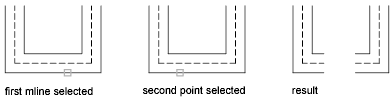
Creates a visual break in a selected element of a multiline.
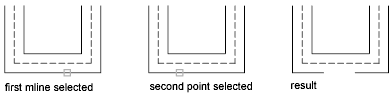
- Select Mline. The selection point on the multiline is used as the first cut point.
- Select Second Point. Specify the second cut point on the multiline.